Posts

For Advanced Techs

Image
Click to Read QRCode After answering questions from average users it appears that things may need to change to better serve techs.  Though previously stated, this is a help site for techs, I have been inundated with questions from users.  Stay tuned.

Toshiba X305 - Powers On, Charge Light but Dead no Video

Image
(Pic 1) bare motherboard on bench This comes from a cousin via UPS from Indianapolis and promised him I'd take a look at it.  The Toshiba X305 is a nice looking machine but still has the flawed nVidia chip design. Disassembling the unit to be able to work on the motherboard without having to have all the connections was a challenge, but eventually I got the unit to work on the bench. Using the Power Jack and external video, it powered on with external video.  This tells me two things. One the GPU is OK but the video memory is defective or not addressing all the lines of the GPU properly.  Picture 2 with the stripes definitely tells me that it is the video memory! Now attempting to repair this issue is similar to the reflow heat process used on an earlier DV series video issue   (with video) .   Picture 3 shows the second screen attempting to boot from network adapter but the characters are incorrect and pixelated.  Picture 4 shows...

DV7 Dead No Lights, will not charge

Image
DV 7 Power In Section Getting back to postings. A DV7 was brought in that was totally dead and would not even light the LED on the side power connector.  These units are totally different than the previous DV2xxx, DV6xxx, DV9xxx series, and the power indicator on the side gets power from the board not the charger. So if the power in is good, it will not give you any indication, because it draws 5v from the laptop and not the DC jack circuit board. When checking the system I used a meter and checked the red wire (Line In POS+) and it had the 19v and the yellow was 0v. Moving to the next chip in the circuit I tested the SI4835 mosfet and it was dead shorted in both directions. So I took it out of circuit and tested it on the bench with meter- same thing.  The mosfet was shorted. When it should allow current in one direction only, it was allowing in both directions and the unit would never power on. Without having the exact number available, I went to the manufacturer...

Gateway MD2641U - USB and Shutdown Problems

Image
Gateway USB ports not read - This Gateway MD2614U would not recognize the USB ports or devices plugged into the unit. The problem was found to be manufacturer packaging mistake.  Unit made by ACER in Taiwan has a large plastic cover on bottom of motherboard, but the surface mount resistors coils, and capacitors were not wave soldered well, so the bonds were not sticking to mobo, instead to the adhesive on the plastic. About 12-15 SMT parts were stuck to the plastic and had to be manually placed on the motherboard in their correct location for the USB ports to be read. The original reason this unit arrived was black screen/no video. Similar to the problem with the DV series using nVidia GPU though this was an ATI Chipset, the Southbridge and GPU were reflowed to assure solderballs were connecting under the chip itself. How did I find out this issue?  Near the USB connectors the resistors were identified by their circuit designation, in this case it was the 300 series. ...

More updates coming

Having been busy has kept me from updating regularly. Now it's just a time management thing. So further updates will be forthcoming. This weekend is a long weekend in the U.S. hopefully I can post more repairs. Compliments with an ad, is still SPAM I would like to ask readers not to post Spam links unrelated. But if you have a post on how to fix something feel free to post. I don't think many readers do not want Generic Viagra, Retirement Home in Costa Rica or discount batteries in France.  So don't be a Blog Troll posting advertising.  That is annoying, and I'm sure you would not like me to make an issue of that. Because it will make me require membership, and confirmation emails before you can post. That effectively reduces communication and answers that many people are looking for.

Acer 5516 - Dead, No Power, No Lights

Image
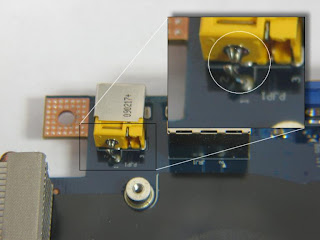
Finally a breather before the storm came. (Load of work) This jack was damaged by drop and or push. The lead broke/shattered as if it was hit while running. Copper can shatter too, you know. This should be clear enough LarryS.

Acer 5515 Works off Battery, Charges, but will not run off AC

Image
This unit arrived working from a charged battery, but will not power on from AC.  My first thought was bad leg on the DC Jack, Easy job! Finally Upon opening the case and removing the keyboard I saw the beginning of the failure. Burnt MOSFET under the keyboard directly behind the battery connector. So took the rest of the panels off to see how bad it was. Out of a scale of 1-10 with 10 being the most difficult I rate this as a 7.5 because it was more annoying than difficult. The copper under the MOSFET was actually welded to the legs of the FET, heating solder would not break the weld. Click to see larger image The visual shows almost the worse case scenario for a shorted MOSFET. Burnt and totally unreadable numbers.  Seeing the circuit I surmised that it was an identical pair of chips but I had to verify against another motherboard to be sure.  Also there was a scorch mark under the keyboard, but it didn't affect the keyboard or any keys. ...

Compaq 6735b - Dead No Lights

Image
This was a strange cookie.  This unit showed no sign of life and was a weird design for power in button.  I have to admit this was a 'lucky' repair. While diagnosing where was the DC power, I discovered that a power MOSFET was open, No Power anywhere, no lights, no charge and stone cold dead. On the bottom of the board it was a mosfet FDS6676 that was open.  When I replaced it with a substitute I was able to follow the DC circuit, but it dropped off at the power button. So testing that area I noticed that when I put the meter positive on point on the board the light behind the pwr button would flash briefly. Recalling a similar experience where I had to modify another CPQ 6735 when they first came out/released. I thought I would try my luck again.  1: With the meter set to VOLTAGE and holding the meter's positive lead on this point, the unit would come on. My first guess was 47k Ohm. This worked but the laptop would not turn off, or would come on when it...

DV6000/DV9000 Lines in LCD and External monitor -unreadable

Image
A fairly common problem with this series is lines in the LCD and external monitor. Sometimes it will exhibit scrambled characters on the screen. Similar issue.  This is because the video memory has fail or lost connection and the addresses cannot be read properly by the system. The rest of the system may work but video is not proper and screen unreadable. Lines and streaks on POST screen Should show BIOS info and CPU info            This shows the step by step on how to correct this problem. There are other videos on YouTube dealing with the 'no-video' issue. Some are dangerous, others are goofy. I will be getting back to that production.  Not wanting to knock anyone for trying, but be careful, some of these guys are not techs or engineers and have no clue of consequences. 

Laptop Rebooting- DV6000, F700

Image
While working on a DV6000 today I decided I should also address other problems with these models while working on the DVD production.  As it seems this problem is also quite common, Rebooting, looping, restarting.  Never getting to the Windows startup screen. OK there are several causes of this scenario with the ribbon cable being shorted or defective.  The ends of the ribbon cable can lift away from the surface when inserted and shorting the lead from the adjacent wire.  Some times it will short and cause the wire to burn. Other times it will cause the REBOOT/LOOP issue.   Also verify that the Coin Sized CMOS battery has 2.5v- 3v, if not or voltage is low, all kinds of problems may present themselves.  Correct operating voltage is needed to read the CMOS data, or the data may be corrupt or deleted. How to test/bypass these? 1: Disconnect the PWR connector cable, and turn the system on with the remote control (if you have one).  Make sure...

Format Change and Redirection??

Considering going to FORUM Format, this way dialog and content can be better grouped and followed.  This will stay up and be mostly for posts, but the forum will be best served for post and pictures that need to be answered.  The Blog only allows pictures at the beginning, and questions afterwards cannot post pictures.  Keep in mind this is intended for Technicians, and experienced individuals.  There is no way that I can train via the internet on how to do something. (At least not in the current format) Since I see that there are lot of others that have been left behind, and some schools are not finishing the job.  I will try to outline and classify better on the new Domain.  You will have to subscribe so that I can at least keep track of my mail, questions and answers. One thing I do ask, is Try to STAY on blog, direct questions to my email address misses hundreds of others that may want to ask the same thing, or are asking the same thing. ...

Writers Block? Nahhh

Due to activity and being summer I had held off posting some items that had come across my desk.  So shortly expect a flurry of activity. A recent email asked several questions that I think I can answer before hitting the grind again. Do I do my own reballing? No, the method I use corrects the solder balls. The biggest defect of BGA and RoHS solder is tempetature and contraction of metal. Down on the atomic level, the valance bonds of the multiple elements used (in solder) break and you get a weak composition. Excessive heat causes metal to retract to themselves. So instead of getting a bond, you get contact.  Example: In the DV series, the breakdown is as follows.  After a period of time and use, the vents on the heatsink will become blocked.  This is from typical use and the placement of the Air In slots on bottom. They draw in fibers from pants, shirts, sheets, bedding, pet and human dander and carpet. Often larger than the vents exit. As more and more...

Open Comment and testimonial page

If you like to leave a general comment- Please post here

IBM Thinkpads No video, No P.O.S.T. Models T40, T41, T42

Advanced Notice:  I will be detailing the method on how to fix Thinkpads - No video No POST issue. This is a quite common problem with the T-Series. 1: The system lights up but nothing shows up on the LCD 2: Nothing shows up on an external monitor 3: Hard Drive does not initialize. What makes my method so much better? You do not have to totally disassemble the whole laptop  (a major time killer). Only need to remove keyboard, and wrist rest. You will not misplace screws and use the wrong screw holes! Following directions it will work the first time! So if you don't have the readily available items here is a brief list to get them ahead of time. Heat gun , similar to those used to heat shrink insulation on wires.    At least 500 watts I got mine at Harbor Freight  and used on LOW Radio Shack Paste Flux $6.99 (mentioned in another section of this blog) Two pieces of thick aluminum foil 4" x 4" (10cmx10cm) .     This it to make ...

What is causing the DV Series to fail prematurely?

I have seen dozens of 'solutions' and fixes for the DV series and none really address the root causes. Others damage or ruin motherboard. Below are some of the weirdest solutions I have seen: 1: Placing a penny between GPU and Heatsink. 2: Using a copper shim (only slightly larger in area than penny) 3: Excessive thermal compound 4: Wrong type of compound. 5: Placing a tea candle (in aluminum holder) on GPU 6: Putting Motherboard in oven 7: Pressing down on GPU real hard 8: Reflowing without flux?! Outline what each does and why it still fails later. 1: This will increase the pressure on the GPU when held down with 5 screws, a temporary solution, but does not remedy. Provides no greater heat dispersal and only transfers heat through penny. Metal fatique may damage the 5th retainer screw and not support the GPU. 2: Copper shim does the same as above. 3: Spreads heat over a larger area but does little to cool. 4: Does nothing 5: Can accidently cause more damag...

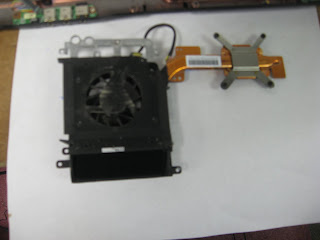
DV9000 Overheating

Image
A DV9208 arrived with overheating problems. Luckily it was caught before it started generating additional issues with the GPU. Symptoms: Unit would overheat, cause shutdown/off without notice. WIFI would turn off Cause: Heat sink vents 75% blocked, so insufficient cooling was the culprit. Repair: Disassemble unit, disassemble heat sink, clear vents. Problem #2 was a little more different. Because the Southbridge would also overheat, causing loss of contact on solderballs. Solution: Clearing the lint from heatsink will remedy issue with overheating/shutdown. Since no drive arrived with unit a substitute drive was used to run system for several hours, then turned off, and test again.  I do this about 4 tests so that nothing happens when it gets back to the customer. Aluminum heat transfer pad for CPU replaced with copper pad.  The pad from HP is only ok, but many times the CPU gets so hot that the Aluminum breaks down and sticks to the CPU. Not providing a...