Posts

Imagine the number of vague questions that I get sometimes

How to correctly ask a question.  Remember this site is intended for shop technicians.  So if you work in another field and really have no clue to electronics, your answer may as well be in Greek, if you do not know what I am talking about.  So please direct your questions appropriately. Hope that clears up some details, that I am frequently asked. Clear Examples of Problems Model Number   DV9418 / DV6608 DV9000 is a series Works with Battery   will not work with AC Works with AC  will not work with battery Charge light   not on when plugged in Turns on Shuts off Runs but No Video Runs but Dim Video Only then can I possibly guess if I can answer your questions.  Not all of them may be answered.

New Month and Thanks

January was a busy month a lot of new. And donations were helpful, freeing me up to do record more projects. So as an added bonus for those that donated I will be setting up a Video Repair section - Via YouTube or another hosting site. There you can see various videos and exactly how I diagnosed and solved the problem.  Thought it might not be professional work it is clearly stated.  If you have donated and do not get the link, feel free to email me. (The volume of mail is quite high as well as me getting distracted on other projects). Why don't I post daily?   [see profile] Well I have other skills too -  Electronics is what I like because it is a challenge. This Blog Graphics and animation because it is interesting and creative. [ Youtube ] Websites because I have friends in need sometimes. Basic Sites Programming because sometimes things are not available that you need TCMS project History   because the past should be preserved. I found an old Hig...

DV4-1255dx - No Video, Blinking lights on topside

Image
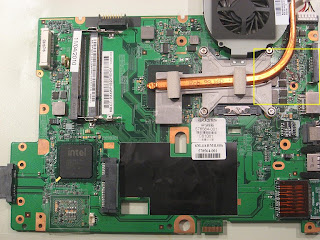
DV4-1225DX Needle in a digital haystack - numerous problems Damaged Coil Side view Problem described as Memory Slot Not working & No Video Since I had never seen this unit come on, with memory in slot 1 or slot 2 there was not much I could do other than thoroughly inspect the system fisrt. Damaged coil Top View 1: Found that a coil under the PC Card slot was broken.     Replaced and Test - No Fix Replaced When peeling back the plastic near the Video connector- looking close I notice a cap is stuck to the plastic. Very small ceramic cap that was hardly noticeable without magnification. Now- Where does if come from and where does it go?  What is it's purpose? Under magnification, I view the area where the smaller components are and see evidence of solder or tampering.  This appears to be the location of the missing/stray cap.    Since this is a multi-step repair... B...

HP G60 No Power- Blinking Power LED

Image
  HP G60 - No Power, Will not turn on, Will not charge This unit arrives with No Power Problem.  When plugging in the AC Adapter I notice that the Power LED is (steady) blinking. The Power button does not work and does not light the charge light, so I can diagnose this as a major POWER IN problem.  Inspecting the power section behind the DC Jack and the bottom side of the board.  Turning the board over, I notice a section burnt and a cap missing.  So- the first thing I do is remove the caps indicated as 1,2 ,3 in pictures. Then do a quick test- plug the power adapter back into the unit. The power LED no longer blinks.  Cleaning up the area shows me that the cap indicated by #3 had severely shorted and the frayed metal end was also shorting the #1 cap. Removing the solder from the pad, and the welded metal from the missing cap, I have a working surface area to replace the parts. These are standard ceramic caps that can be found on an old ...

HP DV5-2035DX External Video, No Video on LCD

Image
Click for larger picture view DV5-2035  No Video, External video works fine A DV5 arrives with complaint-  Video shows on External but not internal video on LCD/LED display. Inspecting the unit near the video section,  the problem is immediately spotted as being a blown transistor. This transistor is one of the switching type that allows the video signal to be displayed/sent to the display. Without this part there will never be any video shown, except on an external monitor. Click for larger picture view Solution: replace blown transistor

Toshiba L455D - Previous repair attempt by another tech

Image
Toshiba L455D - Board Damage Ok so Monday starting off the week I get in a Toshiba L455D and say to myself "this should be easy" since I just had one last week and things went pretty fast. Taking the motherboard from the chassis I immediately see that it had been worked on by a 'hack', unexperienced tech.  Checking my previous notes to see exactly was was damaged I did a side-by-side comparison. The way this board arrived and parts missing- Click for larger view Then I realize that there are simply too many parts damaged and missing to even get the unit back to the way it should be.  So this is one that I will not attempt to repair simply because of the amount of time it would take, and the value of the unit. Solution: Replace motherboard . The way it should be with parts shown - Click for larger view

DV7 Power On By Pass (version 1) - TIP

Image
For the older version of the DV7 you can bypass having to connect the power panel by shorting PIN 9 to ground, this will turn on the unit.  Saving wear and tear on the ribbon cable and connector. This model was a DV7-1150US

Dell Inspiron 14R Spill

Image
This  Dell 14R had a water/coffee spill and blew some parts and pads from the laptop  motherboard. This image shows the resistor PR12 after removed from board. Shown here before cleaning This image shows how it should look, and the  original view. This image shows how the repair had to be  done.  Part of the pad was still visible, and the hole pad had enamel removed to allow connectivity to the pad and trace.

DV7 Power On By Pass - TIP

Image
The DV6000 and DV9000 series has a bypass jumper that you can short to turn on the unit without having to connect the power on button. Now the DV7 also has a method also.  this way you don't have to disconnect from the frame and makes it prone to breakage or scratching the plastic.

Toshiba L455D - Powers On Then Off

Image
Toshiba L455D Blink On then Off Light. Power light functions normally. Charge light functions normally. Does not run. Does not post. Turns on then shuts off. The unit powers on then after a few seconds- shuts off. This is was caused by a shorted MOSFET PQ10 that exhibited a full short 0Ω Since they were in a pair formation, both were replaced so the current level would be balanced.  The cost is so low, that it was not a consideration. Two AO4466 replaced with two AO4468 mosfets which were available.  AO4468 is out of production, but were found on an HP DV6000 near the Maxim [MAX8734/PU10] quad output power distribution chip.             (PQ31/PQ32 on DV6k) The coil PL3 was cracked in half, was not exactly sure if the coil would be defective, but the nature of coils is to push current within the electromagnetic field, so if the field is open the electrons may not go forward, tools did not allow the ability to verify. So it was replaced....

DV5-2155dx - No Video, Blinking lights on topside

Image
I will only report how I fixed it, not answer specifics related to why/how/what or "where can I get parts" questions, because I simply don't have the time to reply to the requests. This DV5 came in with no video display. The problem was a coil L6002 to the right of the GPU shield. The coil and/or pad cannot handle the 'bounce' current that flows through. Taking the coil out of the circuit path eliminates that problem.  Small inset image shows where the coil was and the old path of the circuit. Larger View Shows coil location 

Up Late

Up late trying to make sure everything works, buttons, answering questions that may have been missed. And printing postal addresses. After that last hectic week...

Sometimes it's something else

Earlier today I got my hands on an older Compaq M2000.  It was dead, no lights no anything. So checking the board (which is the same as the V2000 and the DV1000) . The front end MOSFET next to the power jack had bubbling on the surface (probably from overheating) And it was the wrong chip!? It was a SI4425 which has a lower current rating.  So I replaced it with the AO4413/FDS6679 series and tested again.  This time the charge light was on when the battery inserted. This told me that at least the unit was getting power. Then I remembered the common problem with caps on those models, so I started checking the caps. Sure enough I found the shorted cap on the bottom side near the rear of the DVD drive connector. OK replace that and turn on. Everything lights up, except the screen. No display on external. Hmmm - checking the GPU accidentally by touching it was !!HOT!! Used the crayon test, it made a small wax puddle on the chip. This GPU was definitely shorte...

Toshiba A75 - No picture on screen.

TOSHIBA A75 series are workhorses they will run and run.  The only problems I have experienced with this model  that is fairly common is the DC Jack fails, Overheating and onboard memory failure. Since onboard memory can cause the above symptom, that was on of the first things I tested. The memory turns out to be fine. Opening the unit I see that there had been a previous spill that had dried and and was on some important VLSI chips. The next step was to closely inspect the spots where the spill was and visually determine if it could be the cause of failure.  This depends on whether it was on any PCI or video subsystems.  As it turns out it was on the PCI subsystem.

Explanation of Terms

Some of the terms used by techs and myself: Dead: Means No Power, No Lights, No Charge Light.    Check DC Jack , test with known good battery No Power/No Lights: The unit will work from charged battery, but not from AC. Some light may be on.    Check DC Jack. When you move the charge plug with battery installed, the charge light may come on intermittently. This is caused by a cold solder joint on the DC Jack, or bad contact inside the jack.  No Power/With Lights: If you hold the plug at an angle, the unit will come on, but letting go of plug it shuts down.    Check DC Jack Will Not Charge Battery: Unit runs when plugged in, but will not charge battery. Or the battery only last 15min after charging all day.    Check Adapter - Generic or Wrong Amperag e Example -If you are using a 65w charger and trying to charge a DV9000 the battery will never fill up to it's maximum. Volts x Amps = Watts   18.5v x 3.47a = 64w ...

Some questions that were asked.

Image
A few individuals have asked questions direct, and I wish to clarify some items.  It is best when you post on the blog that way it can also answer several hundred other readers questions. Question  1:  How do you check the (brown) ceramic caps. Answer:  Simple, I use a standard Ohm meter in the Resistance mode.  Since the biggest problems with caps when they fail is the become either a direct short, or they will never store capacitance (open).  The meter reads in the ohm mode by sending a small amount of electricity through resistors and report the difference in Ohms. Test with leads RED on one side and Black on the other.  One direction will give you a high resistance ~2000Ω and then reverse the leads on the meter and the other direction should give you Infinity. This is an OK capacitor. If you have a very low resistance or 0 (zero) Ohms, the cap is shorted. Why?:  I started small just repairing for friends and family, after a number of ...

DV9000- Turns on- Shuts off

Image
Symptom 1:  Unit runs for a while then turns off Symptom 2:   Unit turns on, turns off immediately This unit arrives after another tech had attempted repairs.  Numerous screws missing from base and incorrect screws used in reassembly.  Complete tear-down and disassembly. After powering the unit up, I noticed that the heat sink copper was discolored [darkened] which is a sign of high heat.  Upon close inspection I noticed a kink in the heatshrink material covering the wires for the fan wires, so I strip back a portion of the insulation and the red wire was broken, and the black wire was only 2 strands. Yellow and White wires were OK.  Rather than replacing the fan (which is in short supply, and costly) I repaired the broken wires with solder and insulating them so that they would not short each other or the frame of the HS fan, which is negative ground. Screw also missing on the exterior frame that holds the heatsink downward onto the base, th...

Compaq C500 - LED's Flash Rapidly, and never posts or starts

Image
Unit arrives with following symptoms: Flashing LED's on the power panel, and the power  LED on the front edge flashes continuously. [See video] When I connected the DC source with the battery inserted, I thought the charge light would come on as it should regularly. Since it didn't and flashed at the same rate as the other LED's this told me what area to check. When checking the MOSFETs PQ5, PQ49, and PQ4 all of them were of the same type [FDS4435] but PQ49 had a short in both directions with meter set to DIODE mode.  This indicates the FET is shorted.  So that was the first thing to replace and test again.  When I replaced the PQ49 FET and plugged in the charger (with battery inserted) the charge light came on, as it normally should.  Upon powering the unit, it posted normally on external monitor.  Since it was a power in/charge circuit I assumed everything else was fine and reassembled the unit.  All items work. USB/Wifi and other peripher...

Gateway laptop M-Series - Shuts off immediately [M-6750]

Image
This Gateway M- Series  6750 arrived with the following symptoms:  Turns on, but shuts off after about 5 sec.  The lights would flash, then shut down. Counting seven (7) flashes before shutting off. Attempting a cold reset of the BIOS/CMOS it would not complete the reset, and continue to do the same thing.  Because it would not write the CMOS, that shows me the first area to check.   Under close inspection of the board, I notice a coil is burnt, and the number is not visible/readable. [PL20] The burnt coil had also burned the motherboard layer under itself and would require cleaning and insulating the second layer. This was done with a small piece of mylar tape that was placed under the coil before soldering it in place. This repair was a quick repair and not making a complete mask and copper pad for the exit contact of the coil. Works and sufficiently insulates the second layer of the groundplane. MOSFET PQ54 was also replaced simply because the cos...

Compaq C500 - Bad Video Memory

Image
Compaq C500 Arrives with bad video.  The information is displayed just not properly. External LCD also displays same thing. This is related to the video memory of the unit and not the GPU in this case.  This will require a low temp reflow. Because video memory is often not glued to the mother board, low heat has to be used so that the chips become separated from the motherboard. If that happens it will require special equipment and higher cost to the customer. If you unit does not have dedicated memory for video, then it would be the chip that addresses (provides the row and column information for the GPU) the video memory.   This is usually a large chip directly to the side or near the GPU. Typically on Intel models rather than AMD.  Middle picture shown after reflow.   Link   Video showing screen issue  at Youtube  if you have issues displaying from blog.