Posts

Format Change and Redirection??

Considering going to FORUM Format, this way dialog and content can be better grouped and followed.  This will stay up and be mostly for posts, but the forum will be best served for post and pictures that need to be answered.  The Blog only allows pictures at the beginning, and questions afterwards cannot post pictures.  Keep in mind this is intended for Technicians, and experienced individuals.  There is no way that I can train via the internet on how to do something. (At least not in the current format) Since I see that there are lot of others that have been left behind, and some schools are not finishing the job.  I will try to outline and classify better on the new Domain.  You will have to subscribe so that I can at least keep track of my mail, questions and answers. One thing I do ask, is Try to STAY on blog, direct questions to my email address misses hundreds of others that may want to ask the same thing, or are asking the same thing. ...
Writers Block? Nahhh

Due to activity and being summer I had held off posting some items that had come across my desk.  So shortly expect a flurry of activity. A recent email asked several questions that I think I can answer before hitting the grind again. Do I do my own reballing? No, the method I use corrects the solder balls. The biggest defect of BGA and RoHS solder is tempetature and contraction of metal. Down on the atomic level, the valance bonds of the multiple elements used (in solder) break and you get a weak composition. Excessive heat causes metal to retract to themselves. So instead of getting a bond, you get contact.  Example: In the DV series, the breakdown is as follows.  After a period of time and use, the vents on the heatsink will become blocked.  This is from typical use and the placement of the Air In slots on bottom. They draw in fibers from pants, shirts, sheets, bedding, pet and human dander and carpet. Often larger than the vents exit. As more and more...

Open Comment and testimonial page

If you like to leave a general comment- Please post here

IBM Thinkpads No video, No P.O.S.T. Models T40, T41, T42

Advanced Notice:  I will be detailing the method on how to fix Thinkpads - No video No POST issue. This is a quite common problem with the T-Series. 1: The system lights up but nothing shows up on the LCD 2: Nothing shows up on an external monitor 3: Hard Drive does not initialize. What makes my method so much better? You do not have to totally disassemble the whole laptop  (a major time killer). Only need to remove keyboard, and wrist rest. You will not misplace screws and use the wrong screw holes! Following directions it will work the first time! So if you don't have the readily available items here is a brief list to get them ahead of time. Heat gun , similar to those used to heat shrink insulation on wires.    At least 500 watts I got mine at Harbor Freight  and used on LOW Radio Shack Paste Flux $6.99 (mentioned in another section of this blog) Two pieces of thick aluminum foil 4" x 4" (10cmx10cm) .     This it to make ...

What is causing the DV Series to fail prematurely?

I have seen dozens of 'solutions' and fixes for the DV series and none really address the root causes. Others damage or ruin motherboard. Below are some of the weirdest solutions I have seen: 1: Placing a penny between GPU and Heatsink. 2: Using a copper shim (only slightly larger in area than penny) 3: Excessive thermal compound 4: Wrong type of compound. 5: Placing a tea candle (in aluminum holder) on GPU 6: Putting Motherboard in oven 7: Pressing down on GPU real hard 8: Reflowing without flux?! Outline what each does and why it still fails later. 1: This will increase the pressure on the GPU when held down with 5 screws, a temporary solution, but does not remedy. Provides no greater heat dispersal and only transfers heat through penny. Metal fatique may damage the 5th retainer screw and not support the GPU. 2: Copper shim does the same as above. 3: Spreads heat over a larger area but does little to cool. 4: Does nothing 5: Can accidently cause more damag...

DV9000 Overheating

Image
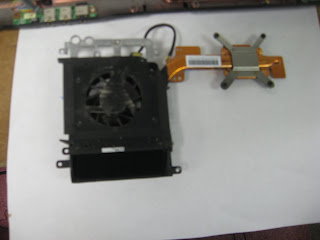
A DV9208 arrived with overheating problems. Luckily it was caught before it started generating additional issues with the GPU. Symptoms: Unit would overheat, cause shutdown/off without notice. WIFI would turn off Cause: Heat sink vents 75% blocked, so insufficient cooling was the culprit. Repair: Disassemble unit, disassemble heat sink, clear vents. Problem #2 was a little more different. Because the Southbridge would also overheat, causing loss of contact on solderballs. Solution: Clearing the lint from heatsink will remedy issue with overheating/shutdown. Since no drive arrived with unit a substitute drive was used to run system for several hours, then turned off, and test again.  I do this about 4 tests so that nothing happens when it gets back to the customer. Aluminum heat transfer pad for CPU replaced with copper pad.  The pad from HP is only ok, but many times the CPU gets so hot that the Aluminum breaks down and sticks to the CPU. Not providing a...

Back from vacation

Since I was out and about, all the time reading news, features and other tidbits from technologists, I decided I would make some observations. Hype vs USE iPad and the real world. Sad to say this unit does not live up to the hype. It is small lightweight and does view the web, but the bad points exceed the good for PC users to jump on the bandwagon GUNG-Ho. 1: The lack of USB on the unit requires additional costs. 2: Using 3G is out of the question unless you pay more. If you have a 4G service such as Clear.Net you cannot even use it. Why? Because it is an x86 install and USB dongle. 3: The entertainment use is out of the question . It cannot view YouTube Videos (which uses Flash Video format -FLV) You cannot use NetFlix (which uses MS Silverlight), and No HULU (again FLV). So that means you cannot do much. Not even view ABC/NBC/CNN/CBS News sources . Such as the tornado pictures from Oklahoma.  Corrections: It seems that some sites are changing their whole direction and...

Important parts on DV6000 and DV9000 series

Image
These are important parts if you are looking for shorts or opens on the DV series. This image shows the location of the FDS6679. A common cause of shorts in the DV series. When the power supply is plugged into the laptop and it shorts out/turns off it's usually caused by this MOSFET being shorted.  Plainly stated. You plug the adapter into the DC Jack and the Blue Ring fails to light up, and the Power Supply shuts off. Giving no power to the tip. To reset adapter, unplug from AC (mains) and wait 15-30 sec. Then plug in again. The adapter is not damaged, since this is how it is protected. These parts do not determine charge time or per centage. The FDS6679 only closes to complete Positive circuit.  The AO4407 only closes when the battery is plugged in. As a test- Check the voltage of the Drain side (pins 5-8) with AC adapter and no battery - you should see 0 volts.  When you contect the battery you should have 10-14v depending on DV6000 or DV9000 series. IF the AO44...

My Review of 2 oz. Non-Spill Rosin Soldering Paste Flux

Image
Originally submitted at RadioShack This electronic-quality rosin soldering flux is mixed with petroleum jelly and ideal for electrical and electronic soldering applications. 2 oz. Non-Spill Rosin Soldering Paste Flux Actually the best available By TheLaptopDoctor from Charlotte, NC on 2/19/2010   5 out of 5 Pros: Good heat control, High quality, Deoxidizing Cons: No liquid version Best Uses: Large Projects, Minor Projects Describe Yourself: Professional It does the job exceptionally well. As a NASA/MILSPEC/AF soldering pro this is currently the best product available retail. Though wishing they had a liquid version available with needle dropper. I heat mine before using a dropper to have it in a liquid state for better flow control. When it has to be exact Tags: results using product ( legalese )

HP DV1000 - Dim LCD

Image
This was a challenging dog of a repair , but after too many hours I had to give it up. Items checked, replaced or repaired. LCD cable - replaced LCD connector - replace and repaired Invertor - checked backlight - checked LCD - checked Lid Switch - checked The LCD was first checked with a known complete lid from another DV1000, the unit still showed same result. So backing up checked the LCD connector first. noticed connector had internal damage -replaced (same problem) noticed motherboard pin 29 was also blown off motherboard - repaired (same problem) lid switch check for open/close continuity - passed backlight - passed The conclusion is that that motherboard damage was greater than initially reported or known. Previous tech had made some minor mistakes, but nothing serious.

Toshiba A205- DC Jack pushed in

Image
This seems to be a common problem on the Toshiba Satelitte A2xx series since I recieved two in two days with the exact same issue. The DC jack is being pushed into the unit. The DC jack fits into a sleeve that should support the jack from being pushed in too far. However the hole in the plastic of the lower chassis is much too large and the user without looking forces the power plug. Breaking the sleeve that holds the jack itself. Poor design by Toshiba on the lower frame. Poor and weak plastic on DC Jack. Insufficient plastic support. Excessively large hole causing the user to break the supports. Solution: The jack can be hot glued onto the lower base of the jack and the left & right edges (not the back). Solves the problem most economically for the customer.

Dell XPS 14.1 Laptop (unk model number)

Image
Unit arrived with dead battery. Would not power on No lights. Not much information provided other than DC Jack issue. This was not the case, the DC Jack was fine, the unit was simply not getting any power. Disassembling and starting to trace the DC in section, the burnt section was immediately noticed. This coil (bad solder/blown pad) was a common problem on the E1505, E17xx series . So checking the coil power shows no voltage reaching the source side (pins 1-3) of the MOSFET. The Coils bottom surface that contacts the pad was blown off so it was an incomplete circuit > Replace Check Mosfet (out of circuit) - DEAD Short. >Replace

Dell Latitude B1300

Image
Synopsis: Would not power on, would not charge Problem: DC Jack Diagnosis: The unit would power on with charged battery and run until depleted. When plugging in AC Adapter the unit would not charge nor any lights come on. NO Positive DC Voltage Solution: Check DC Jack and replace or resolder. In this case only the positive terminal was not contacting motherboard. Reflow/Resolder Jack.

Acer 3690 Touchpad Buttons

Image
Synopsis: Client arrived stated that he was leaving for Australia the next day and wanting to leave his grandmother the laptop after it was repaired. Problem: The unit functioned properly except for the right click button. Diagnosis: After testing I noticed that the button had no détente click that indicates it was not being pushed in when the touchpad click was made. Disassembling the unit shows that the stub which presses the button had broken off. rather than replacing the whole top assembly and touchpad, the buttons were replaced from spares. Original buttons were black, replacement button silver from Acer 5100 series.

Dell Vostro 1000 - Spill

Image
Spill kills DELL Vostro 1000 unrepairable, too many damaged parts to repair economically.

Dell Inspiron 1501 - Dead, No Power, Won't Charge

Image
Picture 1 This is a common problem with the Dell Inspiron 1501/E1705/6000 series. Most of the motherboards use the same general layout and design. You can tell by the white and silver cases used. From my guess, the solder on the leads of FL1 [filter] tend to lose contact after regular use. Perhaps eating away at the Filters pad, due to the current it is carrying. Sometimes it may be years before it finally lose contact, other times only months pass. In this instance the laptop was a couple of years old before it failed. How to fix it: Picture 2 Remove FL1 Clean contact area Replace FL1 Solder back onto clean surfaces. Click picture to see larger image Picture 2 Shows another failed NO Charge issue. FL1 cannot handel the surge when plugged in and eventually arcs then lose contact with the solder pad.  In this case if you cannot find a replacement, you can simply turn the coil [FL1] upside-down, and make sure you have positive voltage on  the circuit. ...

HP NX6220 -Intermittent power problem

Image
This HP NX6220 exhibited a number of symptoms but would never show the same one twice in succession. So it was a challenge finding the weak/bad part. As it turns out it was a capacitor under the Wi-Fi card. [Same value as cap to the right] Replace part and continue checking and checking and turn on. Dead, nothing, no lights, no charge no anything. the choice becomes - Replace or Return to customer since the number of hours are starting to add up with no additional progress.

Gateway MA7/MA3/MA2 - Dead, Won't Charge

Image
Gateway MA7 - MX6958 * Centrino Duo Dead, Battery will not charge Works with good battery, Will not work with Adapter This unit arrived with a common problem that DC jacks presents. However when you continue to use with the defect, it eats the copper around the POS terminal of the jack. In this case the copper had been eaten away, as well as shorting between planes of the motherboards phenolic. So there is only one way to resolve it, by bypassing that section (if possible). The condition of this MA7 was too far gone to be able to bypass. One picture shows the scorching under the copper, the other shows the current path of the DC In. Will verify the model number when returning to shop

Acer Aspire 3680 (Dead)

Image
A CER Aspire 3680 -xxxx This unit comes in Wednesday with symptoms: DEAD Will Not Charge Will Not Work With Good Battery Diagnosis begins by following the DC IN from the DC Jack. The voltage would drop to 3v and not enough to power laptop or close any gates on the MOSFETs. Taking the MOSFET [FDS6675] source side out of circuit shows the direction of the shorted components. Since the power branches to the charge section or the run section with the other MOSFET shown below it. Checking to voltage at the source shows +19v. When in soldered on the board, the MOSFET DRAIN voltage is +3v. After replacing the FDS6675 the DRAIN side is still shorted. Further testing indicates larger capacitor shown (in circle picture 1) is also shorted, removing it from circuit voltage on Drain side is now +19v. But the laptop would not turn on. Still further testing and following the circuit path leads to the top side (facing technician when opened) to a series of three capacitors. Removing one side o...

Dell Latitude D600

Image
A relative common problem with Dell D600 is the right hinge failing, and the laptop screen will not stay in place. The inner bushing of the lid hinge becomes worn, or siezes and when the user forces the lid up to view the screen the bushing breaks. This is a simply a replace hinge repair. Remove LCD Bezel Remove screws holding right side of LCD Remove screws on edge of LCD (4) Remove 1 screw from top of LCD Replace hinge