Posts

Dell Inspiron 1501 - Dead, No Power, Won't Charge

Image
Picture 1 This is a common problem with the Dell Inspiron 1501/E1705/6000 series. Most of the motherboards use the same general layout and design. You can tell by the white and silver cases used. From my guess, the solder on the leads of FL1 [filter] tend to lose contact after regular use. Perhaps eating away at the Filters pad, due to the current it is carrying. Sometimes it may be years before it finally lose contact, other times only months pass. In this instance the laptop was a couple of years old before it failed. How to fix it: Picture 2 Remove FL1 Clean contact area Replace FL1 Solder back onto clean surfaces. Click picture to see larger image Picture 2 Shows another failed NO Charge issue. FL1 cannot handel the surge when plugged in and eventually arcs then lose contact with the solder pad.  In this case if you cannot find a replacement, you can simply turn the coil [FL1] upside-down, and make sure you have positive voltage on  the circuit. ...

HP NX6220 -Intermittent power problem

Image
This HP NX6220 exhibited a number of symptoms but would never show the same one twice in succession. So it was a challenge finding the weak/bad part. As it turns out it was a capacitor under the Wi-Fi card. [Same value as cap to the right] Replace part and continue checking and checking and turn on. Dead, nothing, no lights, no charge no anything. the choice becomes - Replace or Return to customer since the number of hours are starting to add up with no additional progress.

Gateway MA7/MA3/MA2 - Dead, Won't Charge

Image
Gateway MA7 - MX6958 * Centrino Duo Dead, Battery will not charge Works with good battery, Will not work with Adapter This unit arrived with a common problem that DC jacks presents. However when you continue to use with the defect, it eats the copper around the POS terminal of the jack. In this case the copper had been eaten away, as well as shorting between planes of the motherboards phenolic. So there is only one way to resolve it, by bypassing that section (if possible). The condition of this MA7 was too far gone to be able to bypass. One picture shows the scorching under the copper, the other shows the current path of the DC In. Will verify the model number when returning to shop

Acer Aspire 3680 (Dead)

Image
A CER Aspire 3680 -xxxx This unit comes in Wednesday with symptoms: DEAD Will Not Charge Will Not Work With Good Battery Diagnosis begins by following the DC IN from the DC Jack. The voltage would drop to 3v and not enough to power laptop or close any gates on the MOSFETs. Taking the MOSFET [FDS6675] source side out of circuit shows the direction of the shorted components. Since the power branches to the charge section or the run section with the other MOSFET shown below it. Checking to voltage at the source shows +19v. When in soldered on the board, the MOSFET DRAIN voltage is +3v. After replacing the FDS6675 the DRAIN side is still shorted. Further testing indicates larger capacitor shown (in circle picture 1) is also shorted, removing it from circuit voltage on Drain side is now +19v. But the laptop would not turn on. Still further testing and following the circuit path leads to the top side (facing technician when opened) to a series of three capacitors. Removing one side o...

Dell Latitude D600

Image
A relative common problem with Dell D600 is the right hinge failing, and the laptop screen will not stay in place. The inner bushing of the lid hinge becomes worn, or siezes and when the user forces the lid up to view the screen the bushing breaks. This is a simply a replace hinge repair. Remove LCD Bezel Remove screws holding right side of LCD Remove screws on edge of LCD (4) Remove 1 screw from top of LCD Replace hinge

What Kills HP DV series laptops?

Image
The number one issue with DV Series is: Blank or No Video displayed. The number two issue is : (tied) No Wi-fi or Continuous rebooting After repairing a number of HP DV Series laptops. I wanted to isolate the problem and make it easier for me to fix, and have them stay fixed! So digging deep into them I can only come to a couple of conclusions of why they fail. 1: Manufacturing - Hann-Starr Either the oxidation on motherboard or the Graphics Chips. Since the failure comes in both versions AMD and Intel lines. And in Intel and nVidia GPU's it seems it could be at the factory. 2: Distribution - nVidia Could the transit time and shipping packaging be contributing to the oxidation on the GPU? On one unit after a number of reflow failures, I decided to remove the GPU and prepare to 'reball' the chip. Then and only then did I notice there was no solder on some pads. So that points the finger to nVidia. Oxidation is the culprit since the solder balls are put on a ...

IBM Thinkpad R40 DC Jack

Image
No matter how many times I stress that when the jacks start to fail, you should take it to the shop. With each delay and use the problem only gets worse and more expensive. Wiggling the DC Jack to make the positive side supply power to the board eats copper ! Every time there is less surface pad left, and eventually you will totally eat all the surrounding copper making a 25 min job into a 1 hr job (or worse - unrepairable). This jack nearly killed the motherboard which would require a replacement (expensive).

Toshiba TECRA L2

Image
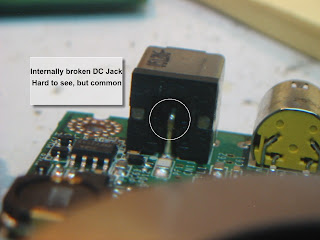
Toshiba Tecra L2 Symptoms : DEAD, No Lights, No Charge Light, No response to power button. This model has had it's issues with the DC Jack. And because the jack breaks at the elbow bend directly behind the IN lead, many techs will miss this and assume further or more complex problem. Then replace the motherboard. It's simple, follow the power from the IN source . After checking the power supply and there is no power on the motherboard follow the IN lead for voltage. Start at the DC Jack and work you way forward. IF no power is on the rear of the DC jack, suspect the jack first. Visual inspection is the key. Because this model uses plastic clips to keep the lead straight it will often be missed. *This jack is also used on GATEWAY MA2, MA3, MA6, and MA7 series laptops

DV9000 Freeze and Shut Off Issue

Image
DV9000 arrived seemingly working well until touched. Upon inspection I noticed that when I would use the right palmrest the unit would shut off unexpectedly. Rebooting, I tapped the area mentioned above. Again it shut off. Reboot this time not touching the unit other than the power button. The Vista OS would load, but hang before completing start up. Disassemble the laptop and visually inspect for short or open connections. During the removal of the hard drive I noticed that SATA1 connector was damaged. This would definitely cause the freeze during boot . Upon further inspection I notice that USB1 was damaged. Pushed in and the pin 2 & 3 were touching the outer portion of the connector that is negative ground. This would cause the shut down. Completely remove the motherboard and replace the USB and SATA1 connector. Not as easy as it seems because the small area to heat and desolder pins. I typically use a magnifying headband and plenty of light. With insufficient lightin...

DV9000 Power Issue

Image
This HP DV9000 arrived with power problems. Difficult to diagnose simply by looking at the bottom side of the board (which faces tech when opened). When the power cable was disconnected from the board an obvious scorched connector was noticed. This 4 pin plug supplies power to 2 sections. Not wanting to be too verbose, I will simply say that all 4 connections to the motherboard are needed and when one pin is scorched and oxidized, it cannot provide adequate current or voltage. So the plug end was replaced, and the interior of the jack was cleaned of carbon residue from the scorching. The number of issues with this unit, makes for a days work. Power issues, broken LCD issues, SATA connector, USB port all on one machine. Everytime I fix one issue another pops up. And the customer wants it fast, but at a cheap price. When does it end?

New Year Same Problems

Image
Thinkpad T40 with NO CHARGE issue. This also applies to: Run off Batteries, but will not work with AC adapter. The power in section circuits are not completed and generally the MOSFETs are open, or the Fuse is open. Easy fix and not much diagnosis is needed.

A busy week kept me from updating

I will post the details of some of the Week's Best after I get the pictures organized. Dell Inspiron 1525 - Works on AC, Won't charge battery. Avertec 6400 - Random shutdown Dell Vostro - Works on AC, Won't charge battery Gateway M350 - Dead!

TGIF

Image
One of the local stores brought over 3 Dell's. (2) Latitude D600, and an Inspirion 1150 all needing DC jacks. So this was an excellent time to try my new (and previously untried) speedy jack removal method. Thank Goodness it worked, I was able to remove a single jack in 3 min versus the old way that took about 20 min, and a good 6" of solder wick. So 17 min saved x 3 =51 total minutes saved. [image show is Dell Latitude D600 bottom after removal]

Even Techs Have Bad Days

Before attempting to post this morning, my system failed. So not wanting to delay others getting their units repaired I left mine in an unrepaired state until I got home this evening. So items posted later than usual. Nothing fantastic, just had to clear the CMOS and then make changes to my tweak settings. Like disabling floppy boot, and looking for a floppy. (Does anyone even use floppy disks anymore?) And making sure the buss is running at 125%.

Toshiba A-205 No USB Ports, No Volume

Image
Problem: Unit arrives with USB1 broken and USB2 not working Also the volume control thumbwheel was rattling around inside the unit. Solution: Replace the USB ports, replace the Audio control potentiometer. Exact Replacement: Yes, from an existing dead unit Notices: This unit has the cheapest USB ports available. By the company saving 13cents, it winds up costing you $$$. There is no front support on the USB ports, so all the insertion and removal force is placed on the back of the connector, first the anchor supports fails, then the upon the next insertion the power and data pins of the USB connector are folded under the connector. This can either short the motherboard, or short the USB chips which the data lines are connected to. You can remove your USB device, but the existing USB connector will remain unconnected from the board, and may cause serious damage to the whole unit. Beware.

Knowing what you have

Here's a suggestion. Get the detailed information about your PC/Hardware/Software and keep it in a safe place. Then if you need to go to a shop, you will have all your licenses ready. Windows/MS Office, Quicken and all your legit software that was expensive to buy!. This can be done online at Belarc.com Why do I say this? I've noticed since Windows XP is no longer sold on newer computers, the Vista license is nothing more than paper glued to the unit. And is no longer a laminated sticker we've become accustomed to. So the average Vista license sticker lasts about 6 months under casual use, and less for the road warrior making it unreadable. Then that subjects you to the shop's option of possibly of having to buy a new copy of Vista or installing a bootleg copy that won't muster the Authentication agent giving you a pester screen, or limited use/access. Some shops just don't know how to get your licenses, from a dead machine. Solution Run Belarc online, prin...

Thinkpad T40

Image
Customer arrives with IBM Thinkpad T40 stating that it will work from a charged battery. But it will not work with known good AC Adapter. Problem: Works on battery, will not work on AC Adapter The problem is caused by 2 things in this case. First the Toshiba TPC8014 MOSFET was reading bad when I checked it with a meter. After I replaced it, the unit was only supplying 10.4v to the charge section of the board. Which is not enough to trigger the adjacent mosfet to supply power to the charge section. So then; checking the Fuse [F2] found that it was blown (open circuit), most likely by the MOSFET being shorted. click on picture to see larger view Solution: Replace MOSFET TPC8014, replace fuse. The MOSFET: 30V N-Channel MOSFET ~11a max rating Exact Replacement: Toshiba TPC8014 comment: The funniest wording of what happens under constant use. Using continuously under heavy loads (e.g. the application of high temperature/current/voltage and the significant change in temperature, etc.) ma...

Dell Inspiron 6000

Image
Finally a breather! I got the opportunity to do a relative easy repair. This 6000 problem was software bloat. So much software and huge registry slowed this system to a crawl. Though commercial software are in all the ads you see on the internet. All of them are not really as good as they say they are. Removed a MAJOR BRAND 'subscription' anti-virus/firewall/pop-up blocker. This program was only fair when it came out, but over hype and advertising made it one of the most popular. The customer came stating that her subscription expired that day. She seemed almost in a panic, and I had to reassure her that it was nothing much to worry about. I removed the "software" and replaced it with AVG Free . [make sure you click the FREE version and not the Full or Trial versions. The full version costs, and the trial is only for a limited time]. Why would I replace a commercial version of the number 1 seller with a free version? Well as it turns out, about 7 years ago I was ...

Acer 5000 Series

Image
Third party repair Problem Keyboard and mouse not functioning, customer stated that USB failed prior to touchpad and keyboard failure. Though the heat and fan issue may not be directly related, it is something that should be corrected when the unit is disassembled. Though it could have caused enough internal heat to warp motherboard (hmmmm) 09/01 ------------- This will be an on going repair ---- ---------- To make a determination whether the keyboard/mouse controller should be replaced or the whole motherboard. Flatpak VLSI chips are really complex to remove and replace. And have to weigh in cost/time/customer factors to get a balance that is acceptable to everyone. The customer The store owner My time. 09/02 After additional tests... This board was heated to see it could be the notorious nVidia/AMD North/Southbridge problem where solderballs were losing contact, [typically on HP/Compaq units made by HannStar] . When warming the unit the motherboard did...

HP ZE2000 Series

Image
This unit came in with problems with keyboard. -Some keys not working -Sometimes the keyboard will not work at all Upon inspection, I found that the retaining clip for the keyboard ribbon cable was not locking into place. But when held manually, all the keys functioned normally. So a decision was made in the most economical sense. Options are: Replace the motherboard [cost ~ $100] Replace the connector [cost $75 for 2 hours labor] Glue the connector in place [$50] Using a Hot Glue gun and only gluing the edges of the connector does several things. Saves the customer money Allows existing parts to be used Keeps the keyboard connector in place The hot glue can easily be removed and not damaging the motherboard any further